2026.1 Release Notes
Schedule
For an explanation of the zones, refer to Where am I hosted?
| Zone | Date | From (UTC) | To (UTC) | Duration |
|---|---|---|---|---|
| Limited Release and UK Limited Release | February 19, 2026 | 01:00 | 05:00 | 4 hrs |
| America East 1, 2 & 3 | March 5, 2026 | 01:00 | 06:00 | 5 hrs |
| America West 1, 2, 3 & 4 | March 5, 2026 | 01:00 | 06:00 | 5 hrs |
|
UK, UK 2, UK 3, EU 1 (English), and German |
February 25, 2026 | 20:00 | 01:00 | 5 hrs |
|
Australia 1, 2, 3 & New Zealand |
March 5, 2026 | 13:00 | 15:00 | 2 hrs |
| Spanish | March 5, 2026 | 01:00 | 03:00 | 2 hrs |
IMPORTANT All dates are subject to change. For up-to-date information on scheduled releases, refer to the Kaseya Status Page.
New Features
Enhanced CC handling for Incoming Email Processing (IEP)
What is changing?
Autotask’s Incoming Email Processing (IEP) now:
-
Retains CC recipients from incoming emails – even if those email addresses do not exist as CRM contacts. All original CC recipients remain visible and available on the ticket.
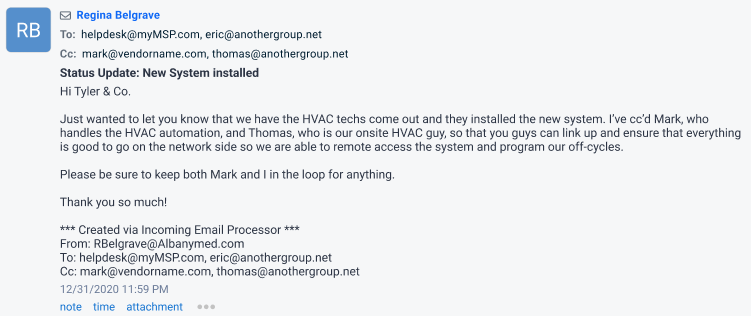
NOTE Unknown CC recipients are not automatically created as CRM contacts. Refer to How we attribute the email.
-
Displays CCs on ticket activities created from incoming emails.
-
Lets you manage CCs (add, remove, keep) when sending notifications from the ticket. When you respond from the ticket, Autotask can mirror the original email’s audience. Refer to the Notification panel for more information.
How are CCs retained?
When an email is processed by Incoming Email Processing (IEP) and converted to a ticket, CC recipients are handled as follows:
-
CC retention is limited to non-contact, non-resource emails
-
CC handling in this feature is primarily for email addresses that are not linked to Contacts or Resources in Autotask.
-
-
Emails associated with a Contact at the ticket’s Company
-
If a CC address matches a Contact at the ticket’s Company:
-
It will appear in Additional Contacts on the ticket only if the IEP mailbox is configured to “Add additional contacts from email.” Refer to Additional Contacts section.
-
If that option is not enabled, the contact will not appear, even though they were CC’d.
-
-
-
Emails associated with a Contact at a different Company
-
If a CC address belongs to a Contact at a different Company, it will not be shown on the ticket as an additional contact or CC.
-
-
Other Recipients behavior in the Notification panel
-
CC addresses that are not Contacts or Resources appear in the Other Recipients field of the Notification panel.
-
If there is more than one such email address:
-
They are grouped together and shown as “Other Recipients”.
-
Individual email addresses are not listed separately and cannot be added or removed one by one from this grouped entry.
-
To include or exclude a specific address, you must manually type it into the To/CC field using type-ahead (or remove it if you previously added it manually).
-
-
NOTE CCs from incoming emails are retained for use on the ticket, but how and where they appear depends on whether the email address is tied to a Contact/Resource and whether the IEP mailbox is configured to add Additional Contacts.
E-invoicing and compliance
Autotask invoices can now be included as PDFs in PEPPOL e‑invoice submissions, helping you meet regional e‑invoicing requirements and streamline billing workflows. Refer to e-Invoicing for more information.
List of improvements and fixes in this release
| Type | Summary |
|---|---|
| Fix | The emailed column in the invoice widget now correctly reflects which invoices have been emailed. |
| Fix | Fixed an issue where some tickets produced a system error (STDE) when opening or editing, caused by specific configurations of the Resolution field. |
| Fix | The Time Entries API has been updated to correctly allow updates to time entries, even when showOnInvoice is true for entries related to recurring service contracts. |
| Fix | The drill‑down view for Invoice widgets now correctly displays the Emailed column as a boolean (checked/unchecked) that matches the actual emailed status of each invoice. |
| Fix | The code that appends notes/time entries to the Resolution now stops nesting <div> elements with each append. |
| Fix | The logic behind the “Create a series of service calls” checkbox on the Recurring Ticket Template has been corrected. |
| Fix | Work Date–based filters in widgets have been changed to use the timesheet period start day, not the internal location’s start-of-week setting. Weekly groupings are now aligned with the configured timesheet period. |
| Fix | You can now apply a contract to all configuration items at once (even with >2100 items) and save without error. |


