2026.2 Release Notes
Schedule
For an explanation of the zones, refer to Where am I hosted?
| Zone | Date | From (UTC) | To (UTC) | Duration |
|---|---|---|---|---|
| Limited Release and UK Limited Release | April 2, 2026 | 00:00 | 04:00 | 4 hrs |
| America East 1, 2 & 3 | April 9, 2026 | 00:00 | 05:00 | 5 hrs |
| America West 1, 2, 3 & 4 | April 16, 2026 | 00:00 | 05:00 | 5 hrs |
|
UK, UK 2, UK 3, EU 1 (English), and German |
April 15, 2026 | 19:00 | 00:00 | 5 hrs |
|
Australia 1, 2, 3 & New Zealand |
April 16, 2026 | 14:00 | 16:00 | 2 hrs |
| Spanish | April 16, 2026 | 00:00 | 02:00 | 2 hrs |
IMPORTANT All dates are subject to change. For up-to-date information on scheduled releases, refer to the Kaseya Status Page.
New Features
 Workforce Management / Resource Planner
IMPORTANT Resource Planner will be in progress from March 25 through April 17 and is available only to pre-selected participants, with limited support during this period. Early access is scheduled to launch for all zones on April 17; however, this date is subject to change.
IMPORTANT Before utilizing Resource Planner, it is recommended to conduct a Data Maturity Assessment to ensure optimal results.
The Resource Planner is a powerful new feature within Workforce Management that gives dispatchers and managers a calendar-based view of your technicians and other internal resources. It’s designed to make scheduling easier, provide real-time visibility into team availability, and ensure work is distributed efficiently—no matter where your team is located.
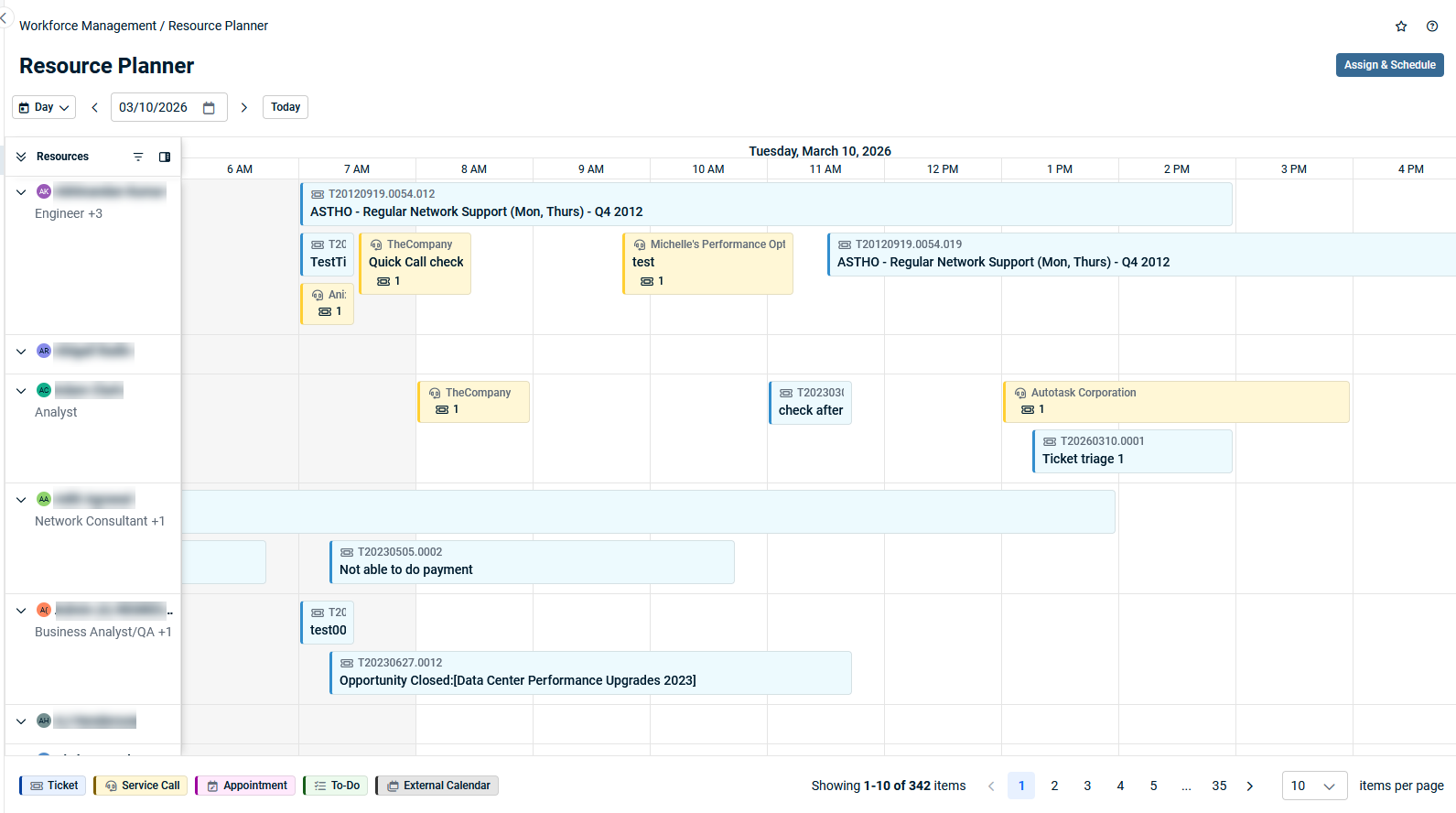
What you can do with Resource Planner
-
See each resource’s schedule on an interactive calendar
Instantly view who is working, when, and where, all in one place.
-
Understand working vs. non-working hours
The calendar clearly highlights business hours (white cells) and non-working hours (gray cells), based on each user’s primary internal location.
-
Time zone intelligence
Schedules are always shown in the correct local time for each resource, so you can coordinate across regions without confusion.
-
Easy navigation
Use the Today button to jump to the current day, and move forward or backward through the calendar with simple navigation arrows. Switch between day and week views as needed.
-
Access control and security
Resource Planner access is managed through Workforce Scheduler activation and security level permissions, ensuring only authorized users can view or edit schedules.
Refer to Workforce Management for more information.
Ticket Triage enhancements
IMPORTANT The Digital Specialist for Ticket Triage will be released in phased groups beginning in May 2026, shortly after Kaseya Connect Las Vegas, for partners with Ultimate, ITSM+, Kaseya365 Ops, or Kaseya365 ITSM licensing. Refer to Digital Specialist for Ticket Triage Kaseya Intelligence FAQs for more information.
IMPORTANT To qualify for Early Access, partners must attend a mandatory training webinar covering data maturity, database preparation, and initial setup requirements. Following Kaseya Connect Las Vegas, eligible partners will be notified by email in phased groups and invited to attend a webinar. Early Access will be enabled no sooner than one week after webinar completion.
Ticket Triage in Autotask gets major improvements across the assignment dashboard, admin configuration, workflow automation, and underlying triage intelligence. These updates are designed to make it easier to see which tickets need attention, understand the impact of Ticket Triage, and safely automate assignments based on confidence thresholds, skills, certifications, and capacity.
Ticket Triage Dashboard
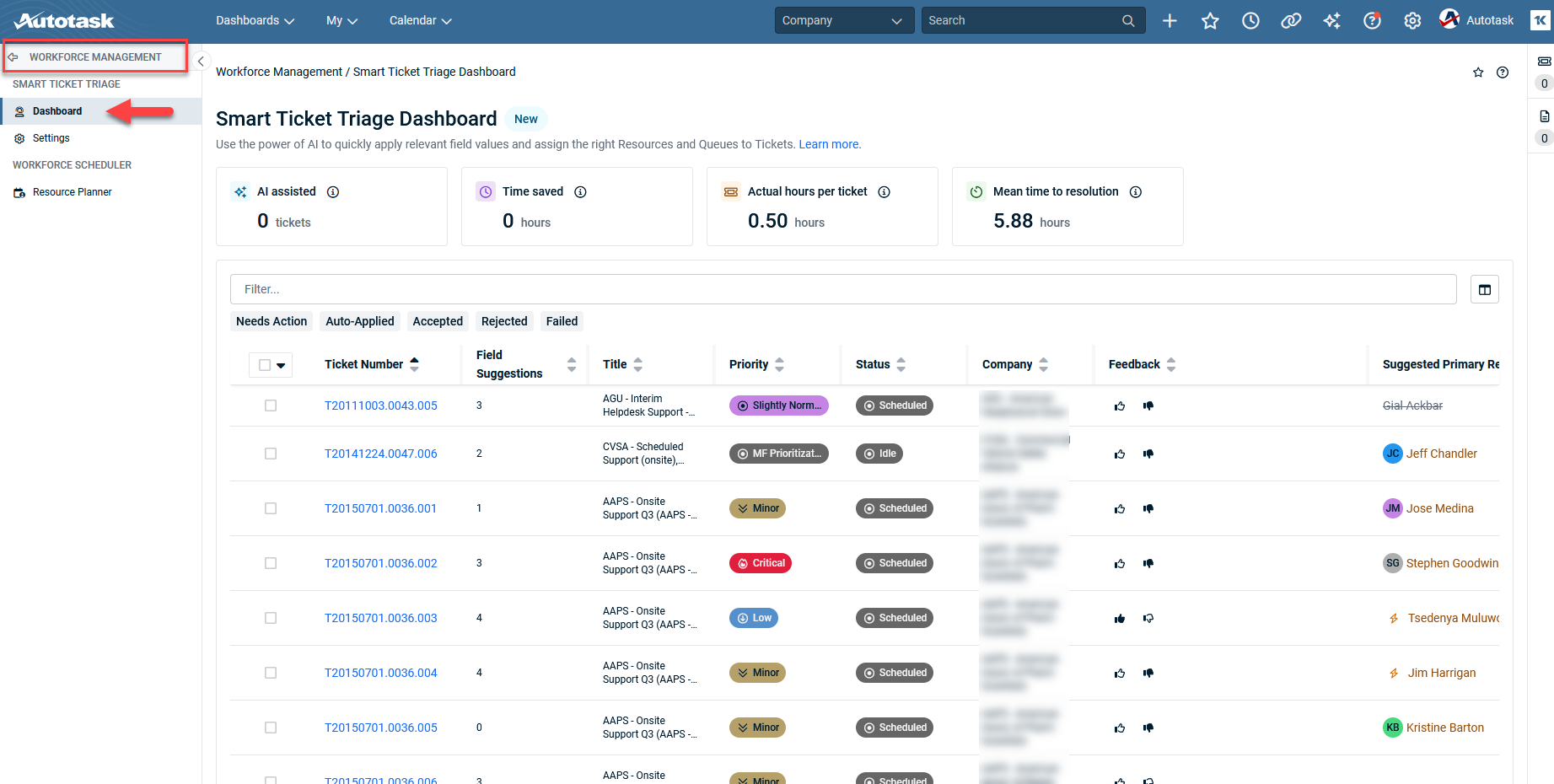
Clear assignment actions and status filters
The dashboard view includes a streamlined toolbar of status filters above the grid:
-
Quickly focus on tickets that:
-
Need Action.
-
Were Auto‑Assigned.
-
Have Failed assignments.
-
Were Accepted or Rejected by technicians.
-
We’ve also polished the UI:
-
Removed unnecessary dropdown arrows on toolbar actions.
-
Ensured key columns such as Queue remain visible and cannot be collapsed away.
This makes it much easier to focus on the right subset of tickets and understand exactly what state each item is in.
Powerful, Reliable Filtering
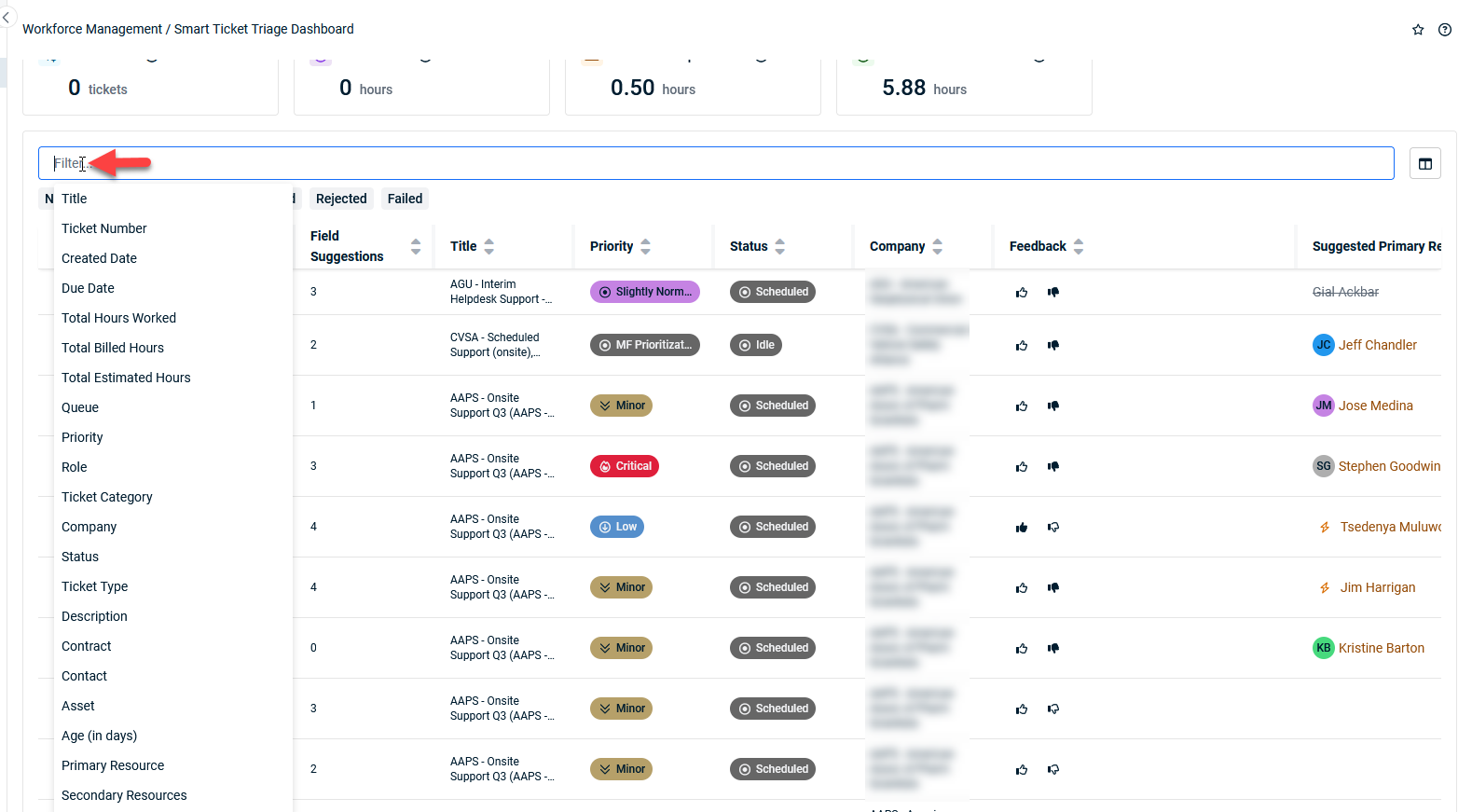
The ticket assignment grid supports robust filtering so you can pinpoint the tickets that matter:
-
Filter by Ticket Number, Title, Ticket Category, Age (in days), and more.
-
Combine multiple filters at once to match your real‑world triage workflows.
Refer to Ticket Triage Dashboard for more information.
Ticket Triage admin settings page
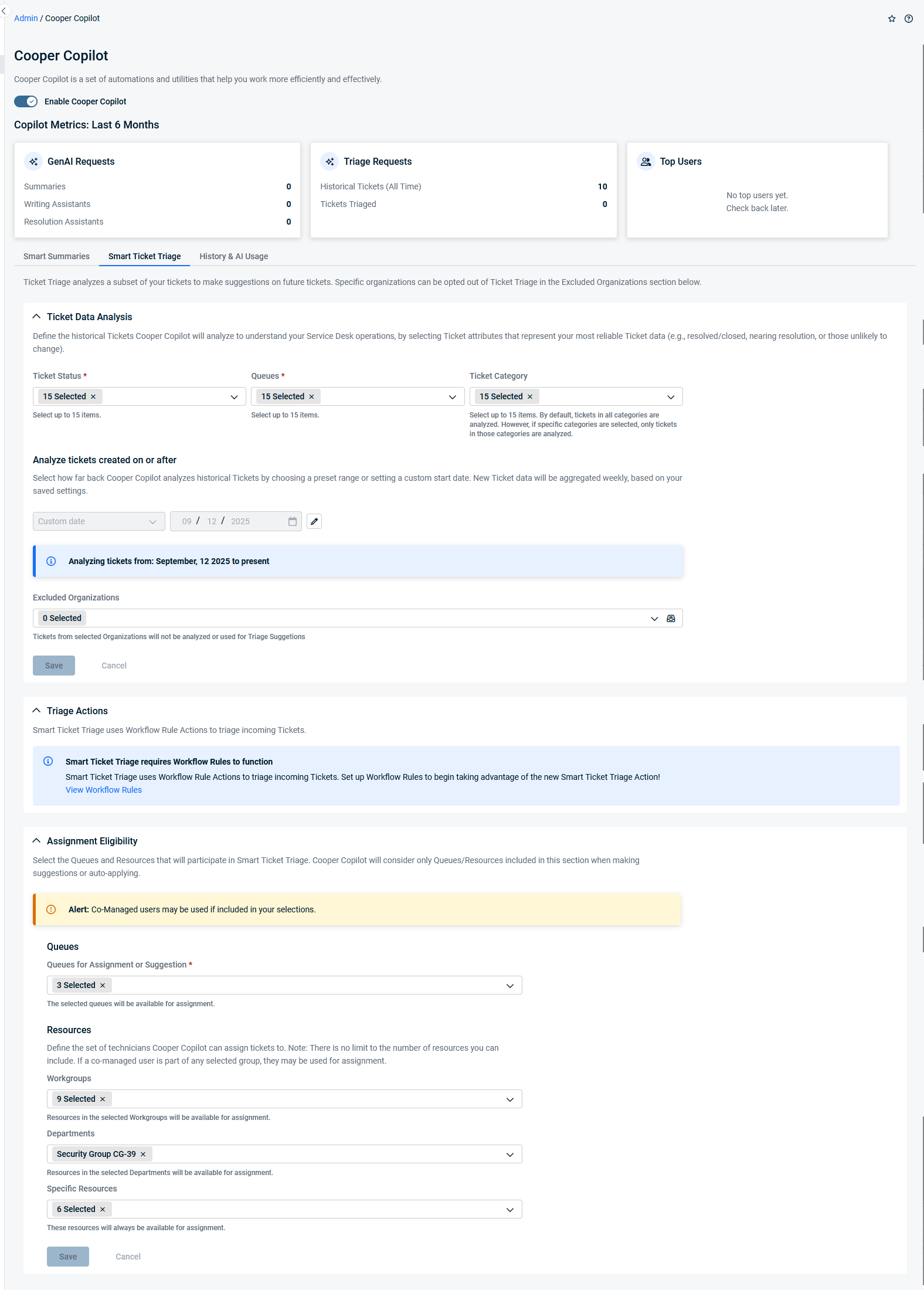
Refreshed Ticket Triage admin page experience
The Cooper Copilot admin screen has been updated for clarity and consistency:
-
A Ticket Category field has been added to triage configuration, providing finer control over which tickets Ticket Triage should handle.
-
Labels and localizations for Ticket Status, Queues, and Ticket Category pickers have been cleaned up and made more consistent.
-
Existing triage configuration, content, and suggestions are organized into collapsible sections, making complex configurations easier to review.
-
Assignment‑specific settings and rule behavior are intentionally hidden from this screen to keep the focus squarely on triage configuration.
Refer to Ticket Triage for more information.
Matching tax calculations between Autotask and QuickBooks Online (QBO)
We’ve enhanced our QBO integration so that Autotask invoices can now use tax calculations generated by QBO’s Automated Sales Tax (AST). This ensures your invoice totals match between Autotask, QuickBooks Online, and ConnectBooster. Refer to Using QuickBooks Online tax calculations in Autotask for more information.
What’s new?
-
Autotask can now rely on QBO’s Automated Sales Tax instead of calculating taxes independently.
-
The QBO integration retrieves line-item and total tax amounts from QBO and pushes them back into Autotask through a new Invoice Accounting Taxes API.
-
Autotask waits for QBO tax data before finalizing invoices and generating PDFs, reducing mismatches between systems.
-
New invoice statuses (such as “Ready for Transfer,” “Pending QBO,” and “Invoice Ready/Invoice Complete”) clearly show where an invoice is in the transfer and tax-calculation process.
Why this matters:
Previously, Autotask and QBO could calculate different tax amounts, leading to invoice total mismatches and confusion in ConnectBooster. With this enhancement:
-
Autotask invoice totals and tax amounts align with QBO.
-
ConnectBooster sees a single, consistent invoice total across systems.
-
You spend less time troubleshooting tax discrepancies and manually adjusting invoices.
Who is this for?
-
Partners using Autotask + QuickBooks Online with Automated Sales Tax (AST).
-
Partners using ConnectBooster and needing consistent invoice totals between Autotask, QBO, and ConnectBooster.
List of improvements and fixes in this release
| Type | Summary |
|---|---|
|
Improvement |
We’re updating Smart Accounting Hub to stay aligned with upcoming improvements to Intuit’s webhook infrastructure, ensuring everything continues to run smoothly and reliably. |
| Fix | Manually entering a date in 'Show Data for' on Umbrella Contracts no longer causes an error. |
| Fix | Expired Umbrella Contracts now open without error. |
| Fix | Print View on tickets no longer intermittently fails with an error. |
| Fix | Adding widgets with the Invoice entity to Company Dashboards now works without error. |
| Fix | Editing Quotes no longer causes the page or platform to become unresponsive. |
| Fix | Resources created via KaseyaOne now have correct daily availability and role assignment. |
| Fix | Selecting Full/No Permission in Security Levels now updates all sections in the 'Other' category as expected. |
| Fix | Site Configuration UDF fields set to 'Always Display' now always appear in webhook payloads. |
| Fix | Company Import Update no longer fails with a system error when 'Enable Invoice Emailing' is set to 'No'. |
| Fix | Opportunity Probability Percentage in widgets now displays as a whole number (e.g., 50%) instead of a decimal (e.g., 0.50%). |
| Fix | Navigating periods in Timesheet List View now takes you to the correct week. |
| Fix | Invoiced Services for Umbrella Contracts now appear in the Contract Export Wizard. |
| Fix | Editing a Service and clearing a single-select UDF value no longer causes an error. |
| Fix | Resource names now display correctly in widgets for Service Call scheduled items. |
| Fix | Contact Groups Email History now respects the 'rows per page' selection. |
| Fix | Contract Renewal Date' UDF now displays in widgets without needing to drill in. |
| Fix | Adding or removing filters from the Services/Service Bundle Search page no longer causes an error. |
| Fix | Quoting Prompt now works correctly when creating a CRM Quote from the + Create menu. |
| Fix | .EML files now display correctly in Company Activity Notes without needing to expand. |
| Fix | Widgets using Company Multi-Select UDF filters now display data for all entity types. |
| Fix | Cooper Co-Pilot now shows a clear message when note content exceeds the character limit. |
| Fix | Deleting a picked Charge now correctly updates Inventory Product available counts. |
| Fix | My Service Desk drop-down now shows correct ticket counts matching Workspace & Queues. |
| Fix | Editing Product Categories with an inactive Default Configuration Item Type no longer causes an error. |
| Fix | Opportunity Stage now only changes after all items in the first Sales Process phase are checked. |
| Fix | Ticket Triage now requires both Status and Queue to be selected before saving. |
| Fix | Loading Configuration Item pages for resources with 'My Territory' CRM permissions no longer causes an error. |
| Fix | Project Rates page now shows all associated departments for team members correctly. |
| Fix | Editing Service Call Statuses no longer defaults to 'Open' or creates a new status row unexpectedly. |
| Fix | Smart Accounting Hub is now visible without needing 'QuickBooks Extension' enabled in Security Level. |
| Fix | Compliance message now appears when associating a device via the Device Mapping page. |
| Fix | First Response Actual Date/Time is now stored in Ticket History and Data Warehouse when Workflow Rules change status. |
| Fix | Moving a device in Datto RMM now updates Last Activity Date/Time and records the change in Configuration Item History. |
| Fix | Adding a new expense to an existing Expense Report no longer causes an error if the approver was added after report creation. |
| Fix | Client Portal now consistently opens tickets and defaults to the correct portal experience. |
| Fix | Dispatch Calendar right-click menu no longer gets cut off when Service Call is near the bottom of the list. |
| Fix | Workflow Rule notifications now fire in the correct order and stop as expected. |


