2026.3 Release Notes
Schedule
For an explanation of the zones, refer to Where am I hosted?
| Zone | Date | From (UTC) | To (UTC) | Duration |
|---|---|---|---|---|
| Limited Release and UK Limited Release | June 3, 2026 | 19:00 | 23:00 | 4 hrs |
| America East 1, 2 & 3 | June 25, 2026 | 00:00 | 05:00 | 5 hrs |
| America West 1, 2, 3 & 4 | July 2, 2026 | 01:00 | 06:00 | 5 hrs |
|
UK, UK 2, UK 3, EU 1 (English), and German |
June 3, 2026 | 19:00 | 00:00 | 5 hrs |
|
Australia 1, 2, 3 & New Zealand |
July 2, 2026 | 01:00 | 03:00 | 2 hrs |
| Spanish | July 2, 2026 | 01:00 | 03:00 | 2 hrs |
IMPORTANT All dates are subject to change. For up-to-date information on scheduled releases, refer to the Kaseya Status Page.
New Features
 Resource Planner
The Resource Planner continues to evolve into a centralized planning hub for dispatchers and technicians.
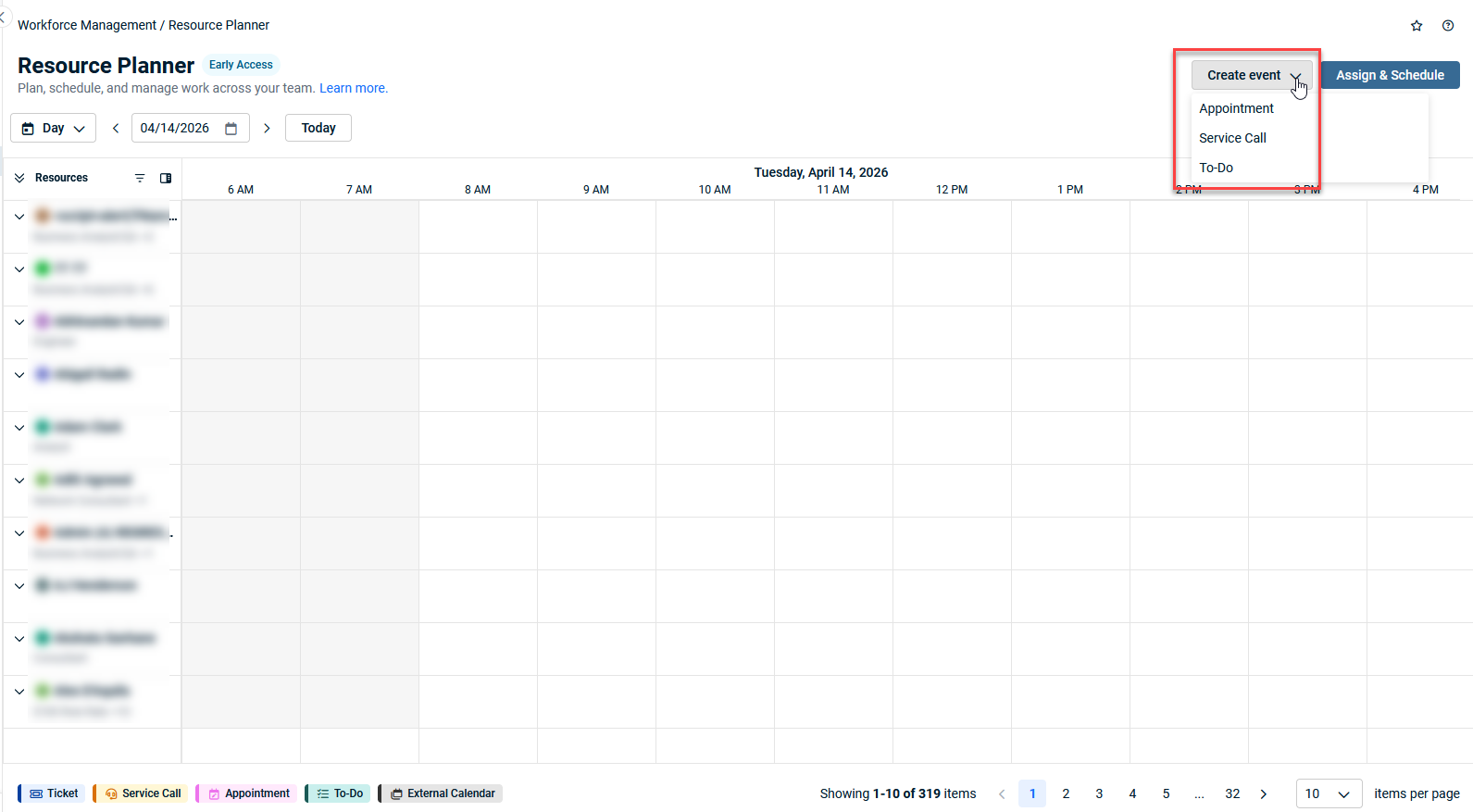
Create and manage appointments
You can now create, edit, and delete appointments directly from the Resource Planner. Click on any empty time slot in the calendar timeline to schedule an appointment for a resource, or use the new Create event button. Appointments include fields for Resource, Title, Description, and date/time, and are immediately visible across the Resource Planner, Dispatch Calendar, and Outlook.
Create and manage to-do's
To-do items can now be created and managed within the Resource Planner. Create to-do's from the timeline or the Create event menu, assign them to resources, and associate them with organizations, contacts, tickets, or opportunities. You can complete, edit, or delete to-do's directly from the planner view.
Create service calls
Dispatchers can now create service calls without leaving the Resource Planner. Select a time slot on a resource's timeline or use the Create event menu to open the service call drawer, where you can assign an organization, schedule tickets, add resources, and set a location — all in one place. Service call descriptions are now also editable from the drawer.
Geomap link on service calls
A new map link icon has been added to service call tiles and the ticket details drawer. Click it to open the organization or location address in Google Maps in a new tab, making it easy for technicians to navigate to on-site appointments.
New columns in the Not Assigned & Not Scheduled items drawer
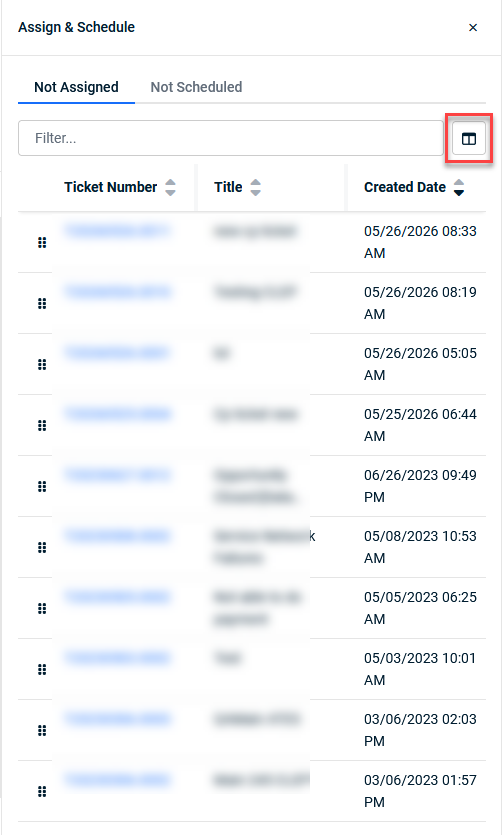
The Not Assigned and Not Scheduled drawers now support three additional columns and filters: Next SLA Event Due, Ticket Category, and Ticket Type, giving dispatchers better visibility and control when prioritizing work.
Ticket Triage
Workflow rules grid in Ticket Triage settings
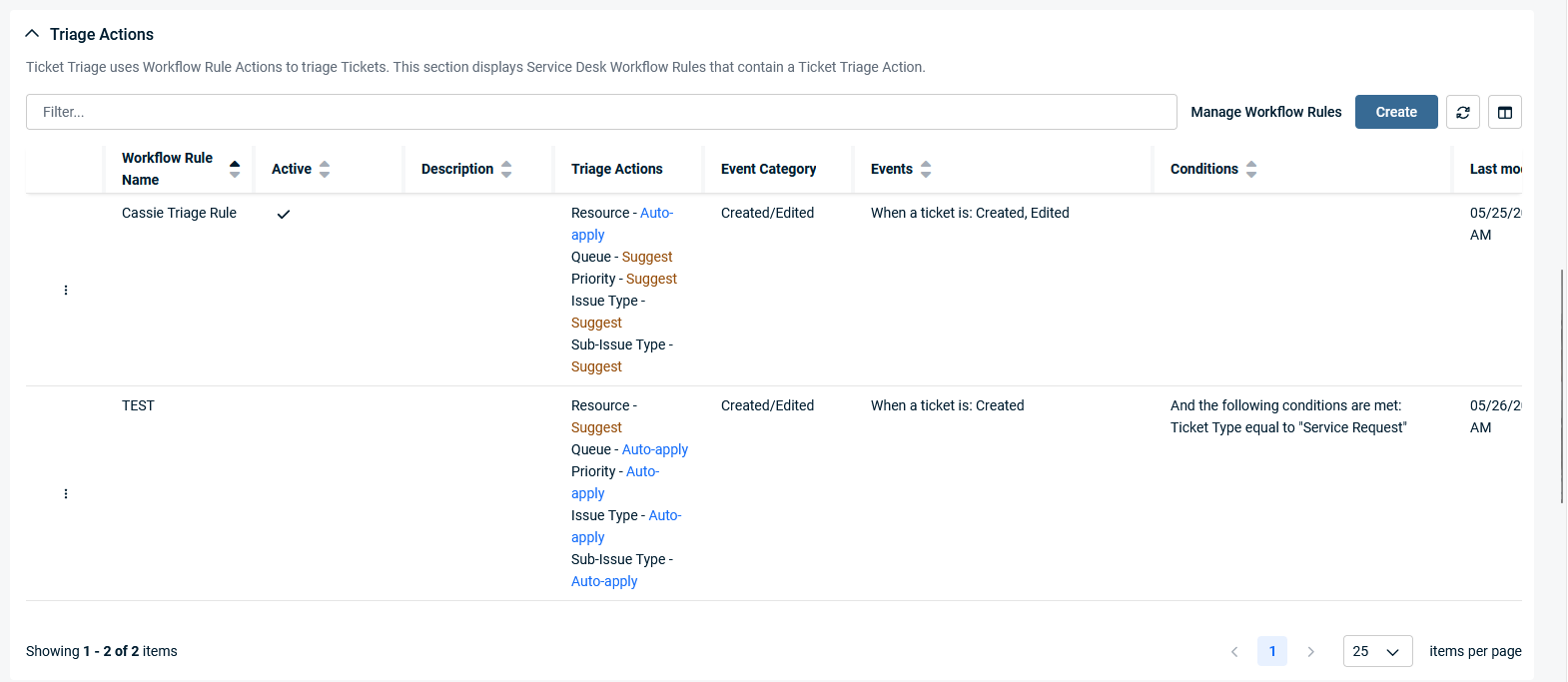
The Ticket Triage admin page (Left Navigation Menu > Admin > Cooper Copilot > Ticket Triage tab) now includes a dedicated workflow rules grid. Admins can create, view, and manage workflow rules that include a Ticket Triage action directly from the settings page, without navigating to the global Workflow Rules page. The grid includes search, filter, and sorting options, and new rules created from this grid default to having the Ticket Triage action enabled.
Suggestion preview drawer
A new Quick Triage drawer is available on Ticket Triage grids. Click the preview icon on any row to open a focused side panel that shows ticket details and AI-suggested field values, including Primary Resource, Queue, Issue & Sub-Issue type, with accept/reject controls for each suggestion. Navigate between tickets using arrow keys for a fast, keyboard-first triage workflow, all without leaving the grid.
Umbrella contracts: Service Package Arrangements
We're introducing Service Package Arrangements, a new arrangement type for umbrella contracts that lets you bundle multiple services into a single, unified package for streamlined billing and contract management.
What's new
Service Package Arrangements allow you to group related services together under one arrangement within an umbrella contract. Instead of managing each service as a separate billing line item, you can now create a package that consolidates them, simplifying both your contract structure and your customers' invoices.
Key capabilities include:
-
Create service packages: Define a new Service Package Arrangement on any umbrella contract, grouping multiple services into a single billable unit
-
Flexible service configuration: Add, remove, and configure individual services within a package, each with its own quantity, pricing, and setup parameters
-
Unified billing: The entire service package appears as a single line item on invoices, reducing invoice complexity for your customers
-
Package-level management: View, edit, and manage the package as a whole, while retaining visibility into the individual services it contains
E-Invoicing
Support for Spain regulations
Autotask now supports e-invoicing for Spain, including compliance with AEAT Verifactu requirements. Key capabilities include:
-
B2B, B2G, and B2C invoicing: A new E-Invoice Type dropdown on the Account Invoice Settings page lets you select the appropriate invoicing model. Each type configures the correct routing identifiers and routing agent automatically.
-
FACe government invoicing (B2G): When sending invoices to Spanish government entities, enter the three FACe role identifiers (Oficina Contable, Órgano Gestor, Unidad Tramitadora) and Autotask handles the routing.
-
PDF stamping with QR codes: Spanish invoices include a QR code placeholder in invoice templates that is stamped by the tax authority upon submission. A new invoice template variable [e-invoice QR Code] is available for configuration.
-
Tax authority reference tracking: A new "e-invoice Authority Reference" column is available in Invoice History to display the Verifactu deep link returned after processing.
List of improvements and fixes in this release
| Type | Summary |
|---|---|
| Fix | The Autotask main menu no longer appears for Dashboard only users, and now stays minimized after a browser refresh. |
| Fix | Resolved an issue where contract service adjustments using more than 4 decimal places produced incorrect rates, which could affect e-invoicing. |
| Fix | Adjustments are no longer created for deleted organizations, which previously showed as failures in activity logs. |
| Fix | Inactive ticket statuses are no longer available for selection when adding a note to multiple tickets from search results. |
| Fix | Resolved an STDE when selecting Print View on a ticket whose ticket category has the Other Recipients field visible. |
| Fix | Resolved a mismatch where workgroup/department level resources set on a category were not available in ticket search filters when the Render all Tickets as Ticket Category: security setting was active. |
| Fix | Resolved an issue where searching for a product using the product selector in ticket charges took a long time and returned no results. |
| Fix | With Use Message-ID enabled, ticket descriptions created via the incoming email processor can no longer exceed the 8,000-character limit. |
| Fix | The service list on umbrella contracts now displays all line items, not just the first 25. |
| Fix | Resolved an STDE when editing a specific service whose end date was adjustable even after the service had been posted. |
| Fix | Service/Bundle is now selectable when mapping configuration items to an umbrella contract. |
| Fix | Widgets using the 100% visualization type now correctly display the 'report on' information in the legend instead of showing only a % sign. |
| Fix | The Miscellaneous/HTML widget now properly honors the Display Widget Name/Label setting. |
| Fix | Resolved a server error that occurred when finishing the Won Opportunity Wizard. |
| Fix | Resolved an STDE when editing and saving an opportunity originally created by the Salesbuildr API. |
| Fix | Changes made to a UDF by a time-based contract workflow rule now correctly update the Last Modified Time column in the Data Warehouse. |
| Fix | Workflow rules using the Initiating Resource's Location condition now trigger correctly for co-managed users. |
| Fix | Resolved inconsistent triggering of CRM workflow rules on certain configuration items. |
| Fix | When using BCC All Internal Resource Recipients (including "Other Email(s)"), the resource in 'Other Email' is now properly BCC'd. |
| Fix | Completing a project through the Complete Project Wizard no longer incorrectly triggers a ticket webhook. |
| Fix | Resolved a 500 error ("incoming request has too many parameters") when querying ChangeOrderCharges via the REST API. |
| Fix | Resolved a 500 error when impersonating a contact who is a member of the Change Advisory Board. |
| Fix | Multi-Select UDF values for the '0' company are no longer removed unexpectedly, and changes are now properly recorded in Account History. |
| Fix | Resolved an STDE that occurred when saving security level edits. |
| Fix | The Datto Networking Partner Integration is now correctly labeled (previously mislabeled as "DTonomy-Security") in the Integration Center API Users tab. |
| Fix | Resolved a server error when attempting to remote control a VSA X device. |


