2026.6 Release Notes
Schedule
For an explanation of the zones, refer to Where am I hosted?
| Zone | Date | From (UTC) | To (UTC) | Duration |
|---|---|---|---|---|
| Limited Release and UK Limited Release | October 22, 2026 | 01:00 | 05:00 | 4 hrs |
| America East 1, 2 & 3 | October 29, 2026 | 01:00 | 06:00 | 5 hrs |
| America West 1, 2, 3 & 4 | November 5, 2026 | 01:00 | 06:00 | 5 hrs |
|
UK, UK 2, UK 3, EU 1 (English), and German |
November 4, 2026 | 20:00 | 01:00 | 5 hrs |
|
Australia 1, 2, 3 & New Zealand |
November 5, 2026 | 13:00 | 15:00 | 2 hrs |
| Spanish | November 5, 2026 | 01:00 | 03:00 | 2 hrs |
IMPORTANT All dates are subject to change. For up-to-date information on scheduled releases, refer to the Kaseya Status Page.
New Features
Ticket Triage
New onboarding and landing page
Autotask 2026.6 introduces a modernized Ticket Triage Landing Page and Onboarding Experience accessible under a new Kaseya Intelligence menu. Designed to streamline service coordinator and dispatcher workflows, this unified dashboard delivers centralized visibility across incoming tickets, triage statuses, and assignment recommendations.
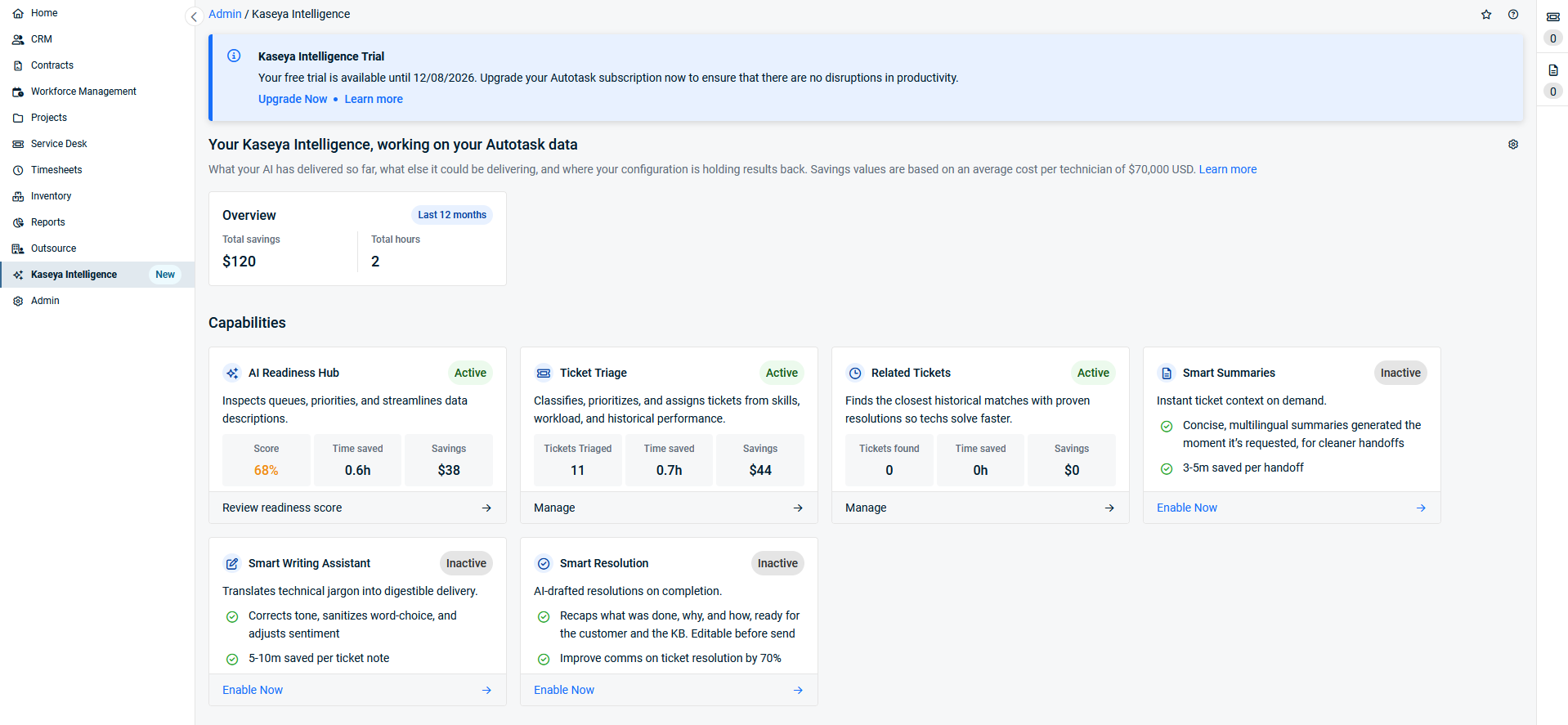
- Interactive KPI metric cards: Instantly monitor key service delivery metrics, including Average Handle Time (AHT), Mean Time to Resolution (MTTR), SLA Compliance percentage, First Contact Resolution (FCR), and AI Adoption Rate.
Resource assignment model update
The Ticket Triage Assignment Engine has been significantly updated with an enhanced multi-signal scoring model to deliver more accurate, balanced, and cost-effective resource assignments.
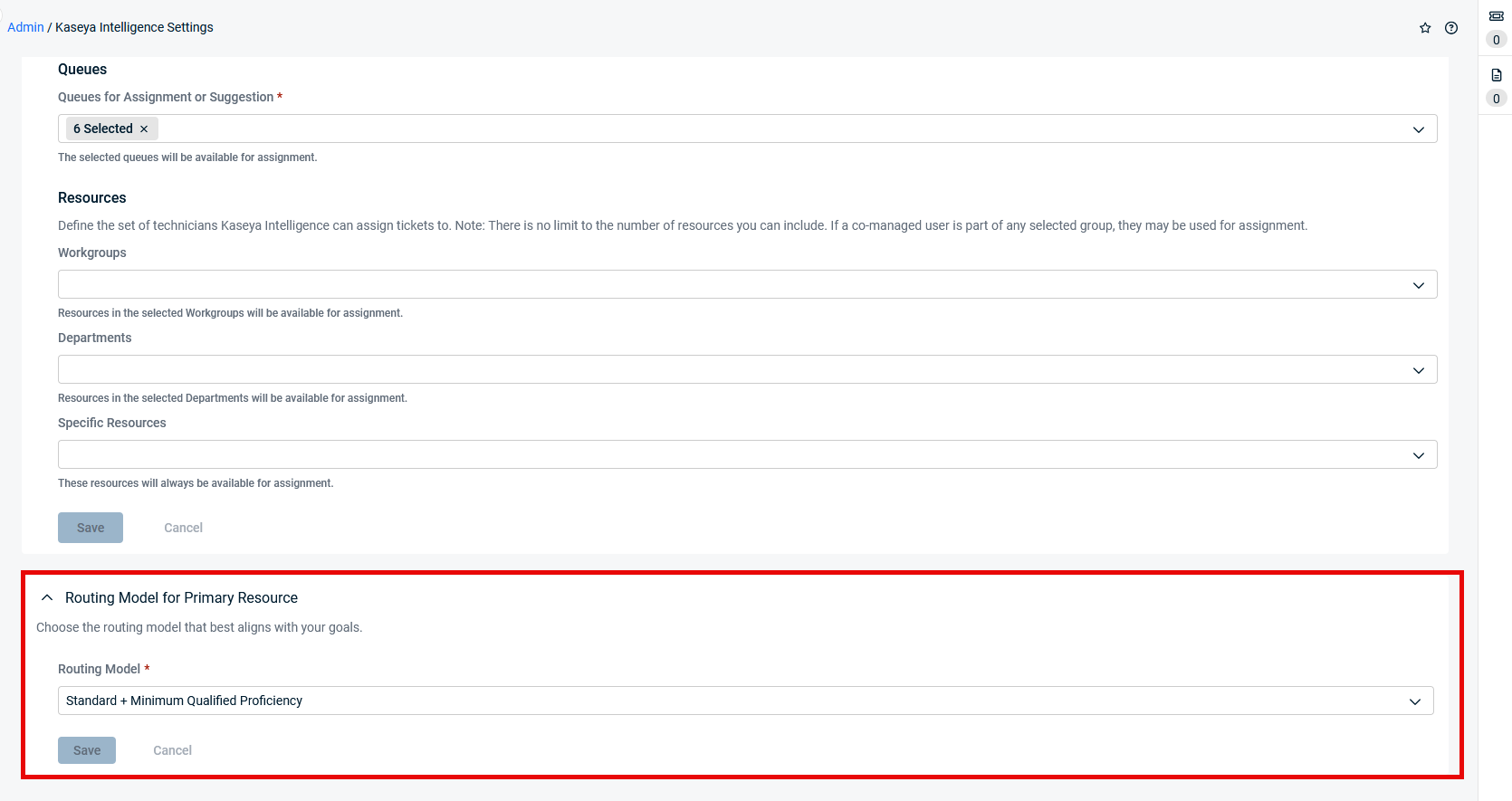
- Multi-factor assignment matching: The engine evaluates technical skills, historical resolution performance, real-time schedule availability, and true workload capacity rather than simple open-ticket counts.
- Tier and urgency-aware routing: Intelligently matches ticket complexity and urgency against technician seniority levels (L1, L2, L3) to avoid over-assigning low-complexity tasks to high-tier resources.
- Natural Language Processing (NLP) for Queue & Role Rules: Administrators can input plain-language routing instructions (with multi-language support) to enforce business-specific routing overrides and guardrails.
- Transparent in-ticket rationale: The in-ticket Ticket Triage Insight panel clearly articulates why a technician or queue was recommended, providing technicians and dispatchers with full context before accepting or overriding suggestions.
- Worklist integration: When enabled, automatically adds auto-assigned tickets to the technician's Worklist without exceeding configured capacity thresholds (up to 25 tickets).
Digital Specialist for AI Readiness
The new Digital Specialist for AI Readiness acts as a proactive data quality consultant to ensure your Autotask service desk environment is optimized for artificial intelligence and automated routing.
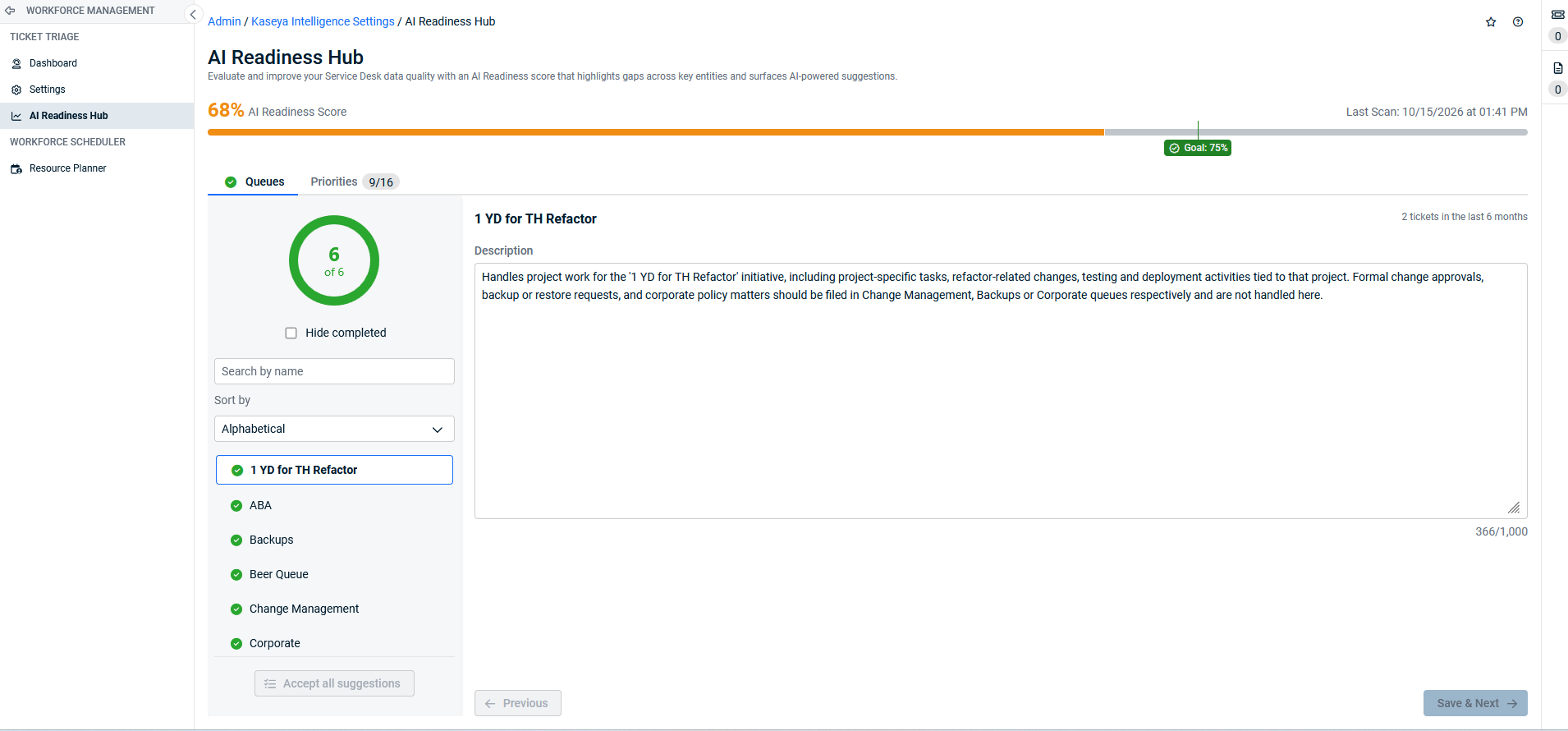
- Automated data maturity score: Evaluates active queues and priorities on a 0–100 scale, measuring field clarity, distinctness, and completeness against proven entity standards.
- AI-generated description recommendations: Identifies blank, vague, or overlapping descriptions and provides robust, context-rich replacement suggestions designed to improve triage classification accuracy.
- Human-in-the-loop action pane: Review recommendations sequentially with full administrative control to Accept, Edit, Generate with KI, or Ignore. Qualified high-confidence suggestions can also be accepted in bulk per entity.
- Non-blocking and audited: Triage automation is never blocked by readiness score levels, and all accepted changes are logged with full user and timestamp audit history.
Resource Planner
Enhanced ticket scheduling
The Resource Planner scheduling engine has been enhanced to reflect complex, real-world service delivery scenarios across multi-technician teams.
- Multi-block ticket scheduling: Schedule a single ticket across multiple independent time blocks and appointments on the timeline without splitting or duplicating the ticket.
- Multi-resource simultaneous scheduling: Simultaneously schedule multiple technicians (primary and secondary resources) to the same ticket across dedicated or overlapping time blocks.
- Unified "Scheduled Items" ticket tab: The previous Service Calls & To-Do's tab in the Ticket UI is now renamed to Scheduled Items. This tab displays all scheduled time entries, service calls, and to-dos in a unified view, complete with resource assignments, start/end dates, calculated duration, and distinct item type icons.
- Assignment state preservation: Adjusting, rescheduling, or removing a time block retains primary and secondary resource assignments appropriately, returning tickets to the unscheduled drawer only when all blocks across all resources are removed.
Improvements
A suite of usability and performance refinements has been added to enhance everyday dispatch and scheduling efficiency:
- Configurable default ticket duration: Administrators can set a global Default Ticket Duration (configurable from 15 minutes up to 8 hours in 15-minute increments; default is 30 minutes) under Resource Planning Admin Settings. When dragging tickets without estimated hours onto the timeline, this duration is applied automatically.
- Timeline responsiveness and rendering: Optimized timeline rendering delivers sub-second pan, zoom, and drag-and-drop operations even across high-volume resource pools.
- Refined visual indicators: Improved calendar conflict badges, appointment status indicators, and clearer visual contrast between primary and secondary resource allocations.
Individual billing code mapping in Smart Accounting Hub
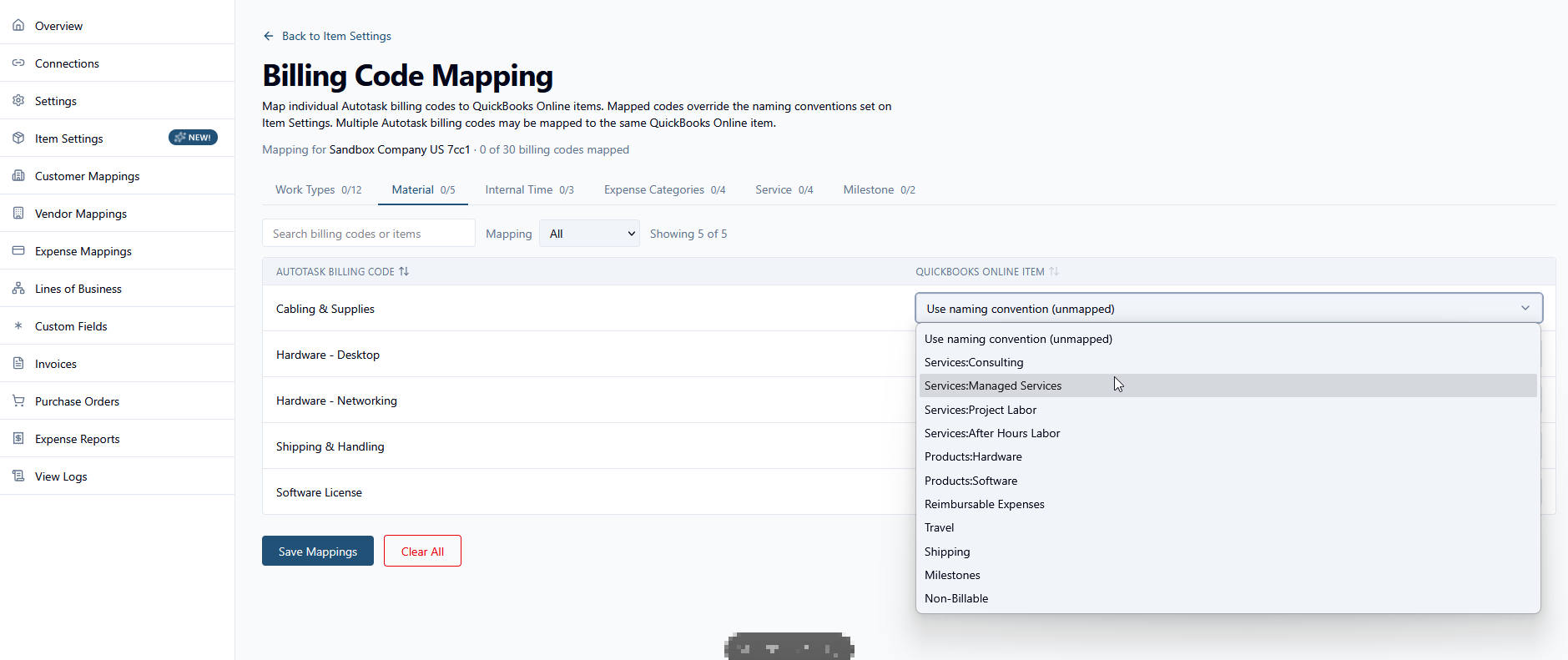
Administrators can now explicitly map individual Autotask billing codes directly to specific QuickBooks Online items.
-
Granular dropdown mapping:
-
Each Autotask billing code is paired with a searchable selector populated directly with items from your connected QuickBooks Online company file.
-
Many-to-one mapping is fully supported, allowing multiple Autotask billing codes to funnel into a single QuickBooks Online item when appropriate for your general ledger setup.
-
-
Safe fallbacks and precedence:
-
By default, billing codes are set to "Use naming convention (unmapped)".
-
During invoice sync, saved explicit mappings always take precedence. Any billing code left unmapped automatically falls back to your existing Item Settings naming conventions, ensuring no disruption to your current workflow.
-
List of improvements and fixes in this release
| Type | Summary |
|---|---|
| Fix | Invoice emails from a batch were sometimes not sent even when invoice emailing was enabled and a valid address was on file. This release resolves the underlying rendering error so all emails in a batch are sent as expected. |
| Fix | In the Client Portal (Early Access), the message from the service provider was truncated to three lines with no way to view the full text. The banner now displays the complete message. |
| Fix | Inactive Autotask companies continued to appear on the Integrated Customer Billing Map by Company page after being deactivated. The grid now shows only active companies, unless an inactive company is already mapped to a non-default organization. |
| Fix | On iOS and Android, opening the Ticket Category settings page to check the visibility of the Other Recipients field caused a server-side error. The field is now returned correctly by the API, and the page loads without error. |
| Fix | Attempting to un-pick more than 993 serialized inventory units from a ticket charge resulted in a server error. The operation now completes successfully for large quantities. |
| Fix | In invoice templates, the Hourly Billing Rate column was blank for rolled-up line items when all grouped items shared the same rate. The column now displays the rate correctly when all grouped items match. |
| Fix | When using the tab key to navigate fields during a Forward/Modify Selected Tickets action in Chromium browsers, a due-time pop-up could trap keyboard focus and prevent the action from completing. Tab order is now handled correctly so the action proceeds without getting stuck. |
| Fix | Editing or copying a workflow rule whose Update UDF action contained a dollar sign ($) in the value caused a server-side error. Dollar signs in workflow rule field values are now handled correctly. |
| Fix | Under specific conditions, enabling the Integrated Customer Billing integration caused a duplicate key error that left the organization mapping list empty. The error is resolved, and organizations now load correctly after the integration is enabled. |
| Fix | After merging tickets from the Company Ticket tab, the ticket selection checkboxes remained checked instead of clearing. Selected tickets are now cleared automatically after a merge completes. |
| Fix | Recurring ticket template instances were incorrectly inheriting service calls that had been manually added to a different instance. Service calls added manually to one instance are no longer copied to newly created future instances. |
| Fix | Drilling into the None secondary group on a dashboard widget returned the total widget count instead of the count for items with no group value. Drill-down results now correctly filter to only the None-grouped records. |
| Fix | Clearing the Company field on a ticket caused the page to get stuck on a loading screen, preventing a new company from being selected. The field can now be cleared and reassigned without the page freezing. |
| Fix | In the Legacy Client Portal, the pop-up window displayed after saving a new ticket appeared very small due to a browser timing issue. The window now opens at the correct size. |
| Fix | Creating a recurring contract from a quote or won opportunity with a large number of services and a long contract term caused a server error, and services were sometimes missing from the resulting contract. The contract creation process now completes successfully regardless of service count or contract length. |
| Fix | Changing the stage using the Lost Opportunity Wizard did not update the Last Stage Change Date in opportunity history. Stage changes made through the wizard now update the tracking date as expected. |


